TikTok size and safe zone
What size a TikTok video, photo post or ad should be, and where the caption and buttons cover it.

What size a TikTok video, photo post or ad should be, and where the caption and buttons cover it.
Version 1.4 · checked and correct as of 6 November 2026
TikTok plays full screen, and the app sits on top of your video the whole time: the caption and sound at the bottom, the like, comment and share buttons down the right. The longer the caption, the more of the frame it covers. Keep your words, logo and product inside the safe zone and nobody misses them.
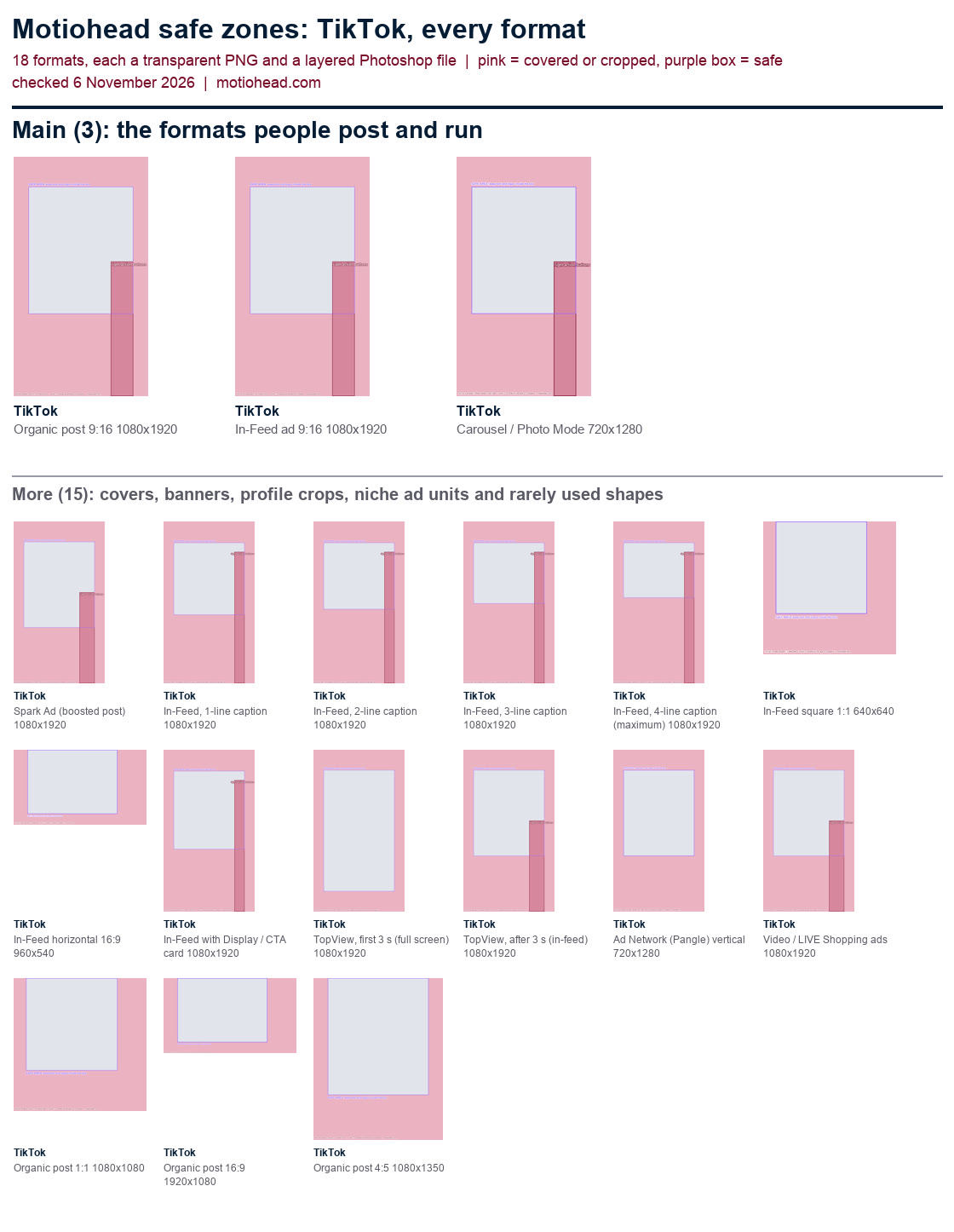
The clear box with the purple border is safe. Pink is covered by the app or cropped on some screens.
1080 × 1920 pixels, 9:16
Covered by the app: the top 240 pixels (12%), the bottom 660 pixels (34%) and 120 pixels on each side. Also: the like, comment and share buttons run down the right edge; tall phones trim a little more off the sides.
Source: our own estimate (the platform publishes none).
1080 × 1920 pixels, 9:16
Covered by the app: the top 240 pixels (12%), the bottom 660 pixels (34%) and 120 pixels on each side. Also: the like, comment and share buttons run down the right edge; tall phones trim a little more off the sides.
Source: the platform's own guide or template.
720 × 1280 pixels, 9:16
Covered by the app: the top 160 pixels (12%), the bottom 440 pixels (34%) and 80 pixels on each side. Also: the like, comment and share buttons run down the right edge.
Source: our own estimate (the platform publishes none).
1080 × 1920 pixels, 9:16
Covered by the app: the top 240 pixels (12%), the bottom 660 pixels (34%) and 120 pixels on each side. Also: the like, comment and share buttons run down the right edge; tall phones trim a little more off the sides.
Source: our own estimate (the platform publishes none).
1080 × 1920 pixels, 9:16
Covered by the app: the top 252 pixels (13%), the bottom 812 pixels (42%) and 120 pixels on each side. Also: the like, comment and share buttons run down the right edge; tall phones trim a little more off the sides.
Source: the platform's own guide or template.
1080 × 1920 pixels, 9:16
Covered by the app: the top 252 pixels (13%), the bottom 878 pixels (46%) and 120 pixels on each side. Also: the like, comment and share buttons run down the right edge; tall phones trim a little more off the sides.
Source: the platform's own guide or template.
1080 × 1920 pixels, 9:16
Covered by the app: the top 252 pixels (13%), the bottom 946 pixels (49%) and 120 pixels on each side. Also: the like, comment and share buttons run down the right edge; tall phones trim a little more off the sides.
Source: the platform's own guide or template.
1080 × 1920 pixels, 9:16
Covered by the app: the top 252 pixels (13%), the bottom 1014 pixels (53%) and 120 pixels on each side. Also: the like, comment and share buttons run down the right edge; tall phones trim a little more off the sides.
Source: the platform's own guide or template.
640 × 640 pixels, 1:1
Covered by the app: the bottom 195 pixels (30%), 60 pixels on the left and 140 pixels on the right.
Source: the platform's own guide or template.
960 × 540 pixels, 16:9
Covered by the app: the bottom 78 pixels (14%), 100 pixels on the left and 210 pixels on the right.
Source: the platform's own guide or template.
1080 × 1920 pixels, 9:16
Covered by the app: the top 252 pixels (13%), the bottom 740 pixels (39%) and 120 pixels on each side. Also: the like, comment and share buttons run down the right edge; tall phones trim a little more off the sides.
Source: the platform's own guide or template.
1080 × 1920 pixels, 9:16
Covered by the app: the top 240 pixels (12%), the bottom 240 pixels (12%) and 120 pixels on each side. Also: tall phones trim a little more off the sides.
Source: the platform's own guide or template.
1080 × 1920 pixels, 9:16
Covered by the app: the top 240 pixels (12%), the bottom 660 pixels (34%) and 120 pixels on each side. Also: the like, comment and share buttons run down the right edge; tall phones trim a little more off the sides.
Source: the platform's own guide or template.
720 × 1280 pixels, 9:16
Covered by the app: the top 160 pixels (12%), the bottom 440 pixels (34%) and 80 pixels on each side.
Source: our own estimate (the platform publishes none).
1080 × 1920 pixels, 9:16
Covered by the app: the top 240 pixels (12%), the bottom 660 pixels (34%) and 120 pixels on each side. Also: the like, comment and share buttons run down the right edge; tall phones trim a little more off the sides.
Source: our own estimate (the platform publishes none).
1080 × 1080 pixels, 1:1
Covered by the app: the bottom 329 pixels (30%), 101 pixels on the left and 236 pixels on the right.
Source: our own estimate (the platform publishes none).
1920 × 1080 pixels, 16:9
Covered by the app: the bottom 156 pixels (14%), 200 pixels on the left and 420 pixels on the right.
Source: our own estimate (the platform publishes none).
1080 × 1350 pixels, 4:5
Covered by the app: the bottom 375 pixels (28%) and 120 pixels on each side.
Source: our own estimate (the platform publishes none).
A transparent PNG and a layered Photoshop file for every format above. Put one on top of your design and you see exactly what the app covers.
Get the free overlaysHave us make itEvery platform's sizes: the sizes table. More guides: Instagram.



AI-assisted.
Directed and finished by hand.
Website design by Motiohead.
© 2018–2026 Motiohead Ltd. Registered in England and Wales.
