Instagram sizes and safe zones
What size every Instagram post, Reel and Story should be, and where the app covers your picture or video.

What size every Instagram post, Reel and Story should be, and where the app covers your picture or video.
Version 1.4 · checked and correct as of 6 November 2026
Instagram shows the same picture or video in up to three places: the feed, full screen as a Reel or Story, and as a tile in your profile grid. Each one covers or crops a different part of the frame. Make it at the right size, keep the important part inside the safe zone for every place it will appear, and it reads everywhere.
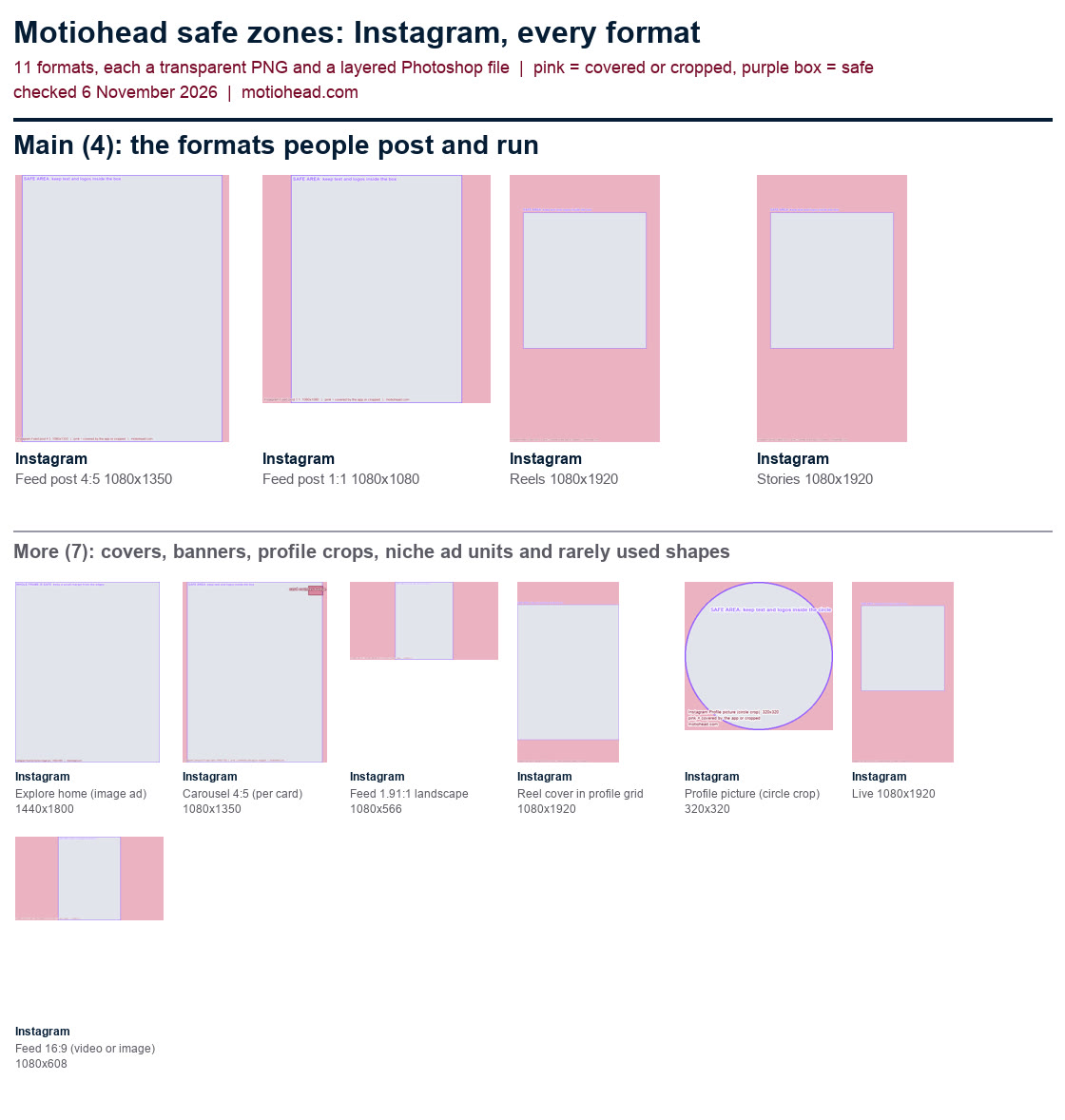
The clear box with the purple border is safe. Pink is covered by the app or cropped on some screens.
1080 × 1350 pixels, 4:5
Nothing covers it where it is shown, so the whole frame is safe; keep a small margin from the edges. Also: your profile grid shows it as a 3:4 tile and cuts the sides.
Source: agency guides (the platform publishes none).
1080 × 1080 pixels, 1:1
Nothing covers it where it is shown, so the whole frame is safe; keep a small margin from the edges. Also: your profile grid shows it as a 3:4 tile and cuts the sides.
Source: agency guides (the platform publishes none).
1080 × 1920 pixels, 9:16
Covered by the app: the top 269 pixels (14%), the bottom 672 pixels (35%) and 65 pixels on each side. Also: tall phones trim a little more off the sides.
Source: the platform's own guide or template.
1080 × 1920 pixels, 9:16
Covered by the app: the top 269 pixels (14%), the bottom 672 pixels (35%) and 65 pixels on each side. Also: tall phones trim a little more off the sides.
Source: the platform's own guide or template.
1440 × 1800 pixels, 4:5
Nothing covers it where it is shown, so the whole frame is safe; keep a small margin from the edges.
Source: the platform's own guide or template.
1080 × 1350 pixels, 4:5
Nothing covers it where it is shown, so the whole frame is safe; keep a small margin from the edges. Also: a counter badge sits in the top right corner; your profile grid shows it as a 3:4 tile and cuts the sides.
Source: agency guides (the platform publishes none).
1080 × 566 pixels, 1.91:1
Nothing covers it where it is shown, so the whole frame is safe; keep a small margin from the edges. Also: your profile grid shows it as a 3:4 tile and cuts the sides.
Source: the platform's own guide or template.
1080 × 1920 pixels, 9:16
Covered by the app: the top 240 pixels (12%) and the bottom 240 pixels (12%).
Source: agency guides (the platform publishes none).
320 × 320 pixels, 1:1
Covered by the app: the top 47 pixels (15%), the bottom 47 pixels (15%) and 47 pixels on each side.
Source: agency guides (the platform publishes none).
1080 × 1920 pixels, 9:16
Covered by the app: the top 250 pixels (13%), the bottom 760 pixels (40%) and 65 pixels on each side. Also: tall phones trim a little more off the sides.
Source: our own estimate (the platform publishes none).
1080 × 608 pixels, 16:9
Nothing covers it where it is shown, so the whole frame is safe; keep a small margin from the edges. Also: your profile grid shows it as a 3:4 tile and cuts the sides.
Source: our own estimate (the platform publishes none).
A transparent PNG and a layered Photoshop file for every format above. Put one on top of your design and you see exactly what the app covers.
Get the free overlaysHave us make itEvery platform's sizes: the sizes table. More guides: TikTok.



AI-assisted.
Directed and finished by hand.
Website design by Motiohead.
© 2018–2026 Motiohead Ltd. Registered in England and Wales.
